Integrating Smytten-New with EasyEcom

Integrating Smytten-New with EasyEcom

By following the steps below, you can integrate Smytten-New with EasyEcom.

Step 1: Open 'Account Settings'

From the EasyEcom dashboard, click the three-dot (meatball) menu and select Account Settings.


Step 2: Go to 'Add Channels'

On the Account Settings page, click Add Channels.
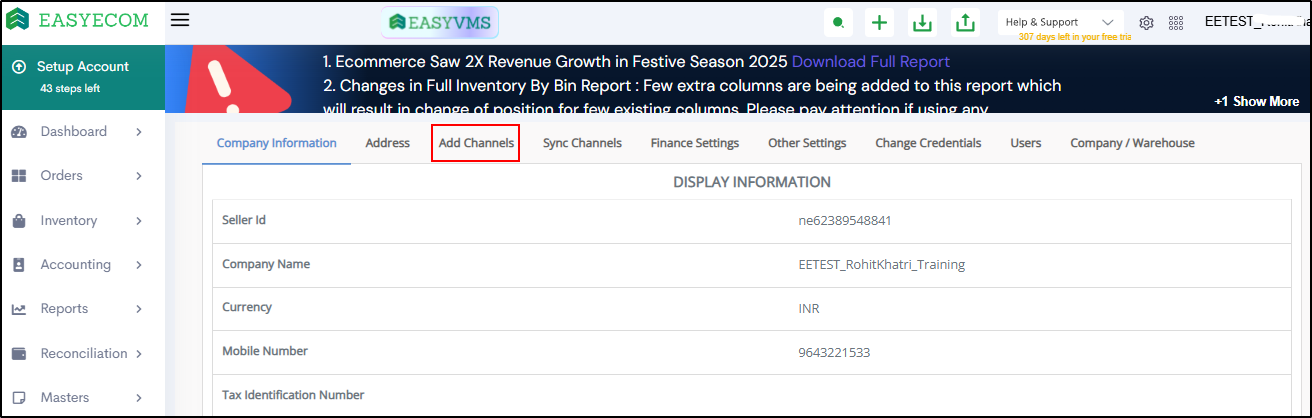

Step 3: Select Marketplace

From the list of marketplaces, select Smytten-New.
A configuration pop-up will appear.


Step 4: Enter Marketplace Credentials

In the pop-up, enter the following details:
  • Tenant Code
  • Facility Code
Note: Tenant Code and Facility Code are shared by the Smytten team.
  • In Shipping Provider Code, enter SELF
Click Add Channel to proceed.

Product Creation Option

  • If Create Products Automatically is enabled, EasyEcom will automatically create Master SKUs for all SKUs available on Smytten.
  • If this option is not enabled, you must manually upload the product master and map it with Smytten listings.

Once completed, Smytten-New is successfully integrated with EasyEcom.
    • Related Articles

    • Integrating Ekart with EasyEcom

      Overview Ekart can be integrated with EasyEcom as a shipping carrier to manage shipment creation, shipment tracking, and return processing. Once integrated, EasyEcom can automatically create shipments in Ekart and receive shipment status updates. ...
    • Integrating DHL Express with EasyEcom

      By following the below-mentioned procedure you can integrate DHL Express with EasyEcom and configure it as a shipping carrier for order fulfillment. Step 1: Navigate to 'Masters > Carrier Master' In the toggle menu, navigate to: Once you click on ...
    • Integrating GrowSimplee/Blitz with EasyEcom

      By following the below-mentioned procedure you can easily integrate Grow Simplee with EasyEcom. Step 1: In the toggle menu, navigate to “Masters>>Carrier Master” Step 2: Click on the “Add New” button Once you click on Carrier Master you will be ...
    • Quick Commerce Integration - Big Basket

      By following the steps below, you can integrate Big basket with EasyEcom. Assumptions POs are created by MP and sent via emails to the seller. Sellers must activate auto-forwarding of PO emails to email.int@easyecom.io. Sellers must ensure that only ...
    • How does EasyEcom work?

      As soon as you sign-up your account with EasyEcom and Integrate all your channels you will be amazed to see how EasyEcom can make your operations very much simple and stressless. It helps you to perform activities related to the Order process, Stock ...