Integrating Shipease with EasyEcom
By following the below-mentioned procedure you can easily integrate Shipease with EasyEcom.
Step 1: In the toggle menu, navigate to “Masters>>Carrier Master”
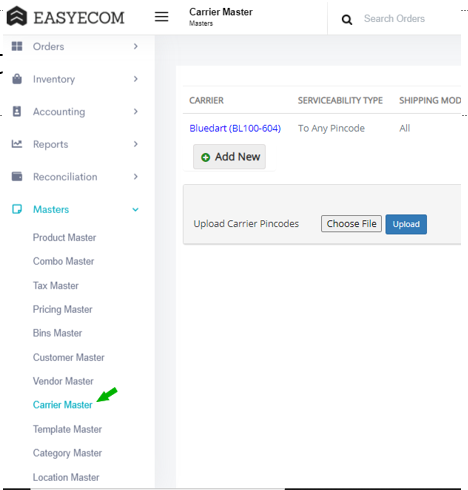
Step 2: Click on the “Add New” button
Once you click on Carrier Master you will be navigated to the following page:
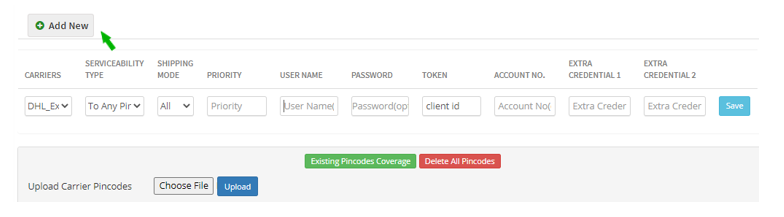
Here click on the “Add New” button.
Note: If you have already integrated other shipping carriers please scroll down to find the “Add New” button.
Step 3: Select Shipease
Select your Carrier as “Shipease” from the drop-down options.
Enter Carrier Username and Carrier Password in respective field.
Enter Carrier Token in Token field.
Enter Carrier Base URL in Extra Credential 1 (Base URL-https://app.shipease.in/core-api/channel)
Enter Carrier Token in Token field.
Enter Carrier Base URL in Extra Credential 1 (Base URL-https://app.shipease.in/core-api/channel)
Please Enter Extra Credential 2 in the given Format.
Extra Credential 2: email, password, location_key.
(Please Note: you are required to enter comma separated values along with spaces between each parameter)
The Email should be an API user in the EasyEcom account, Please follow the UserRole article for further steps.
Password will be the EasyEcom password for the above user Email,
Location_key will be the seller token of the warehouse where the carrier partner is integrated.
Then click on the “Save” button.
You have now successfully integrated Shipease with EasyEcom.