Integrating Commerce 7 with EasyEcom
By following the below-mentioned procedure you can easily integrate Commerce 7 with EasyEcom.

Step 2: Click on the “Account Settings” option
Once you click on the meatball menu, you will see the following fly-out menu:
Here click on the “Account Settings” option.
Step 3: Click on “Add Channels”
Once you click on Account Settings you will be navigated to the following page:
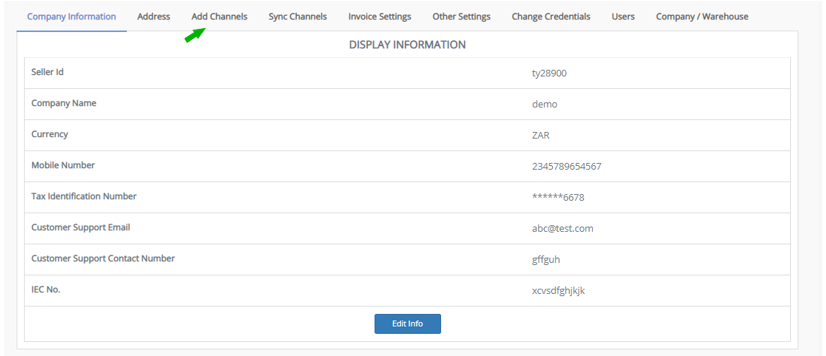
Here click on “Add Channels”.
Step 4: Select Marketplace “Commerce 7”

Here please click on the “Commerce 7” button.
Once you click on it the following pop-up will appear:
You are required to enter your TenantID in required columns.
Once you have entered all the details in the pop-up click on the “Add Channels” button.
Note: If you enable the "Create Products Automatically" option, EasyEcom will automatically create a Master SKU of all your listed SKUs in Commerce 7. This is the easiest way to mirror the catalogue from Commerce 7 to EasyEcom.
If you choose to not enable “Create Products Automatically”, you will have to upload the product master manually and map it with your Commerce 7 listings.
You have now successfully integrated Commerce 7 with EasyEcom.
Related Articles
Quick Commerce Integration - Big Basket
By following the steps below, you can integrate Big basket with EasyEcom. Assumptions POs are created by MP and sent via emails to the seller. Sellers must activate auto-forwarding of PO emails to email.int@easyecom.io. Sellers must ensure that only ...
Quick Commerce integration- Swiggy-InstaMart
Assumptions POs are created by MP and sent via emails to the seller Sellers must activate auto-forwarding of PO emails to email.int@easyecom.io. Sellers must ensure that only emails containing POs for Swiggy Instamart are forwarded automatically. To ...
Integrating Alle with EasyEcom
Please follow the below-mentioned process to integrate Alle with EasyEcom. Step 1: Click on the “Account Settings” option Once you click on the meatball menu, you will see the following fly-out menu: Here click on the “Account Settings” option. Step ...
What is EasyEcom and who should use it?
EasyEcom is an AI-driven powerful tool that assists users to list, manage their products across multiple e-commerce platforms, in turn, providing oneself with a single interface to control their Inventory flow across all portals and manage orders ...
Create "Initiate Returns" in Easyecom
Software Plan: Startup, Growth & Enterprise Account Type: Seller Account, Aggregator Account & 3PL Account Inventory Type: Serialized & Non Serialized Feature Description The "Initiate Return" process is required when the customer places a return ...