Integrating Vaaree with EasyEcom
Please follow the below-mentioned process to integrate Vaaree with EasyEcom.
Step 1: Click on the “Account Settings” option
Once you click on the meatball menu, you will see the following fly-out menu:
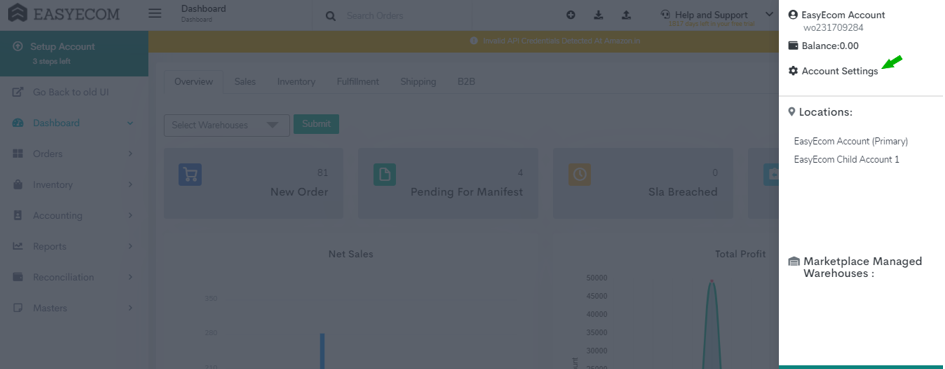
Here click on the “Account Settings” option.
Step 2: Click on “Add Channels”
Once you click on Account Settings you will be navigated to the following page:

Here click on “Add Channels”.
Step 3: Select Marketplace “Vaaree ”
Here please click on the “Vaaree” button.
Once you click on it the following pop-up will appear:
Enter Vaaree marketplace credentials.
Note:
Don't enable the "Create Products Automatically" option.
Enable "API Mode" from "Sync Channels" section.
Please ask the Support Team to get the inventory and order status webhook configured.
Please create an API User role and share the Username, Password, Location-Key with Vaaree Team.
Location-Key is the EasyEcom Seller ID.
Webhooks to be configured:
Update Inventory
Marketplace : NA
Action : V1
Token : To Be shared from the Vaaree team
Email :
Confirm Order Start:
Marketplace : Vaaree
Action : V2
Token : To Be shared from the Vaaree team
Email :
Cancel Order
Marketplace : Vaaree
Action : V1
URL : https://dp0yyrnnl3.execute-api.ap-south-1.amazonaws.com/prod/marketplace-webhook?topic=cancel_order
Token : To Be shared from the Vaaree team
Email :
You have now successfully integrated Vaaree with EasyEcom.
Important:
Please note that the inventory trigger will be separate as per warehouse level and there will be no addition of the inventory count from all the warehouses while we trigger the webhook.
For example, let's say there are 3 warehouses. Inventory is added in 2 warehouses by 10 units each, and reduced in the third warehouse by 5 units. The system will send 3 separate inventory updates via webhook for each warehouse separately
Order routing across warehouses can be managed by EasyEcom. Please inform our Support Team if order routing needs to be enabled
For example, let's say there are 3 warehouses. Inventory is added in 2 warehouses by 10 units each, and reduced in the third warehouse by 5 units. The system will send 3 separate inventory updates via webhook for each warehouse separately
Order routing across warehouses can be managed by EasyEcom. Please inform our Support Team if order routing needs to be enabled