Integrating Shadowfax with EasyEcom

Integrating Shadowfax with EasyEcom

By following the below-mentioned procedure you can easily integrate Shadowfax with EasyEcom. 

Step 1: In the toggle menu, navigate to “Masters>>Carrier Master”
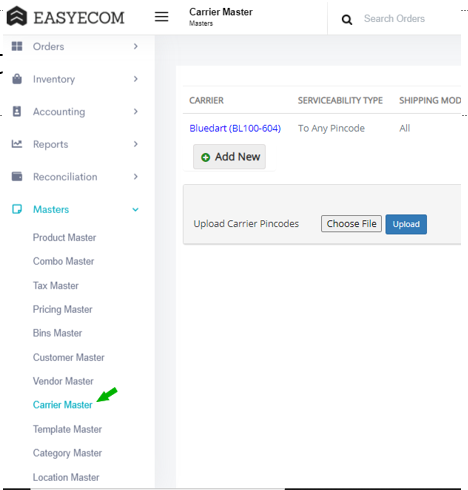


Step 2: Click on the “Add New” button

Once you click on Carrier Master you will be navigated to the following page: 
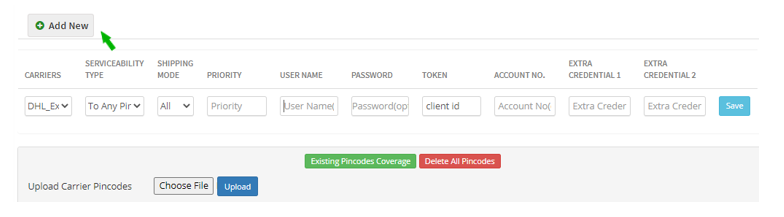


Here click on the “Add New” button.

Note: If you have already integrated other shipping carriers please scroll down to find the “Add New” button.


Step 3: Select Shadowfax


Select your Carrier as “Shadowfax” from the drop-down options. 

Enter your Shadowfax token in the Token field. Please contact Shadowfax Team for the same.

Enter the Shadowfax model in the Extra Credential 1 -> Please choose from the given options and enter the exact text: "marketplace" or "warehouse"
Default Value: marketplace

Then click on the “Save” button. 


You have now successfully integrated Shadowdfax with EasyEcom

Please Note: Shadow fax is currentyl not supported for Invoice value>=50k, due to E-way bill restrictions


    • Related Articles

    • Integrating Ekart with EasyEcom

      Overview Ekart can be integrated with EasyEcom as a shipping carrier to manage shipment creation, shipment tracking, and return processing. Once integrated, EasyEcom can automatically create shipments in Ekart and receive shipment status updates. ...
    • Integrating Marketplace using EasyEcom Standard APIs

      You can easily integrate your marketplace with EasyEcom by following the process explained in this video and/or the integration workflow document shared with you.  Marketplace Integration Frequently Asked Questions  1. Do we need to add carrier ...
    • Integrating DHL Express with EasyEcom

      By following the below-mentioned procedure you can integrate DHL Express with EasyEcom and configure it as a shipping carrier for order fulfillment. Step 1: Navigate to 'Masters > Carrier Master' In the toggle menu, navigate to: Once you click on ...
    • Integrating GrowSimplee/Blitz with EasyEcom

      By following the below-mentioned procedure you can easily integrate Grow Simplee with EasyEcom. Step 1: In the toggle menu, navigate to “Masters>>Carrier Master” Step 2: Click on the “Add New” button Once you click on Carrier Master you will be ...
    • How does EasyEcom work?

      As soon as you sign-up your account with EasyEcom and Integrate all your channels you will be amazed to see how EasyEcom can make your operations very much simple and stressless. It helps you to perform activities related to the Order process, Stock ...