Integrating OpenCart with EasyEcom
Please follow the below-mentioned process to integrate OpenCart with EasyEcom.
Step 1: Click on the “Account Settings” option
Once you click on the meatball menu, you will see the following fly-out menu:
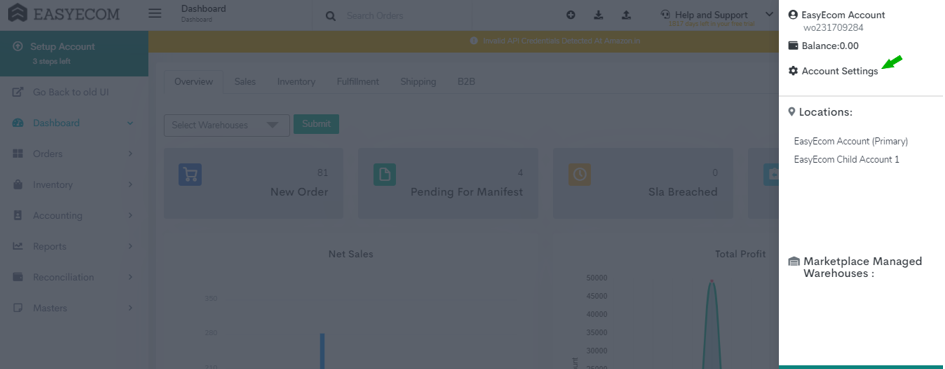
Here click on the “Account Settings” option.
Step 2: Click on “Add Channels”
Once you click on Account Settings you will be navigated to the following page:

Here click on “Add Channels”.
Step 3: Select Marketplace “OpenCart”
Here please click on the “OpenCart” button.
Once you click on it the following pop-up will appear:
Enter OpenCart marketplace credentials.
Note:
Don't enable the "Create Products Automatically" option.
Enable "API Mode" from "Sync Channels" section.
Please ask the Support Team to get the inventory and order status webhook configured from backend.
You have now successfully integrated OpenCart with EasyEcom.
Important:
Inventory update triggers will be sent at the location/warehouse level. For example, if there are 3 warehouses added in EasyEcom, and inventory gets updated in any one of them, the inventory webhook trigger will be shared for that warehouse only.
Please note that the inventory trigger will be separate as per warehouse level and there will be no addition of the inventory count from all the warehouses while we trigger the webhook.
For example, let's say there are 3 warehouses. Inventory is added in 2 warehouses by 10 units each, and reduced in the third warehouse by 5 units. The system will send 3 separate inventory updates via webhook for each warehouse.
Order routing across warehouses can be managed by EasyEcom. Please inform our Support Team if order routing needs to be enabled
For example, let's say there are 3 warehouses. Inventory is added in 2 warehouses by 10 units each, and reduced in the third warehouse by 5 units. The system will send 3 separate inventory updates via webhook for each warehouse.
Order routing across warehouses can be managed by EasyEcom. Please inform our Support Team if order routing needs to be enabled