Integrating Myntra SJIT with EasyEcom
Description
This article explains how to integrate Myntra SJIT with Easyecom.
Myntra SJIT uses Myntra-managed warehouses for fulfilment. Sellers must obtain specific credentials from Myntra to enable this integration.
By following the below-mentioned procedure you can easily integrate Myntra SJIT with EasyEcom.
Step 1: Open 'Account Settings'
From the EasyEcom dashboard, click the three-dot (meatball) menu and select Account Settings
From the EasyEcom dashboard, click the three-dot (meatball) menu and select Account Settings
Step 2: Go to 'Company/Warehouse'
On the Account Settings page, go to Company/Warehouse and Click on Myntra SJIT
On the Account Settings page, go to Company/Warehouse and Click on Myntra SJIT
Step 3: Enter Credentials
Enter the credentials provided by Myntra:
- Warehouse ID
- Merchant ID
- Secret Key
- Username
- Password
- Get Stock from Marketplace (Yes/No)
- Tax Identification Number (GSTIN)
Click Next.
Step 4: Enter Additional Details
On the next screen, enter the following:
- Billing Address
- Shipping Address
- Manage Inventory
- Select Yes or No as required.
- Copy Master SKU from Primary
- Select Yes or No as required.
Click Save.
Post Configuration
- After clicking Save, the SJIT warehouse will be added to your Easyecom account.
-
Logout of the Easyecom system and then Login again to see the addition.
-
The newly added warehouse will appear under:
Dashboard > Three Dots aka Meatball Menu > Marketplace Managed Warehouses
- After clicking Save, the SJIT warehouse will be added to your Easyecom account.
- Logout of the Easyecom system and then Login again to see the addition.
- The newly added warehouse will appear under:
Dashboard > Three Dots aka Meatball Menu > Marketplace Managed Warehouses
Once you click on the meatball menu, you will see the following fly-out menu:
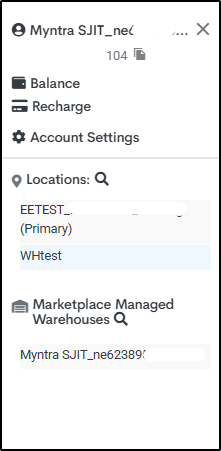
This warehouse will now be used for Myntra SJIT order and inventory processing.
This warehouse will now be used for Myntra SJIT order and inventory processing.
Reports Available
After successful integration, the following reports are available for Myntra SJIT:
| Report Name | Purpose |
|---|---|
| SJIT_Orders_Report | Lists shipped orders (Order Status = SH) |
| SJIT_Customer_Returns_Report | Lists fully returned orders (Order Status = Ret Delivered / Delivered) |
| SJIT_Inventory_Report | Shows current inventory count |