Integrating GoSwift with EasyEcom
By following the below-mentioned procedure you can easily integrate GoSwift with EasyEcom.
Step 1: In the toggle menu, navigate to “Masters>>Carrier Master”
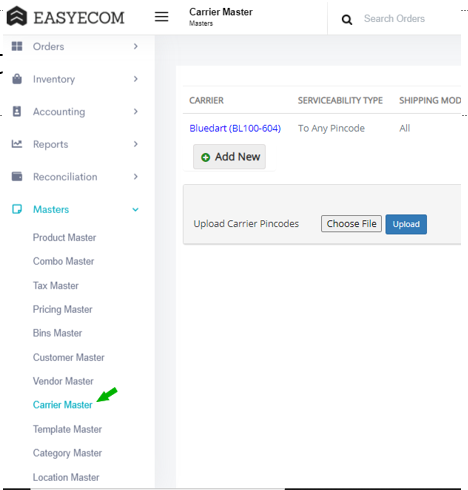
Step 2: Click on the “Add New” button
Once you click on Carrier Master you will be navigated to the following page:
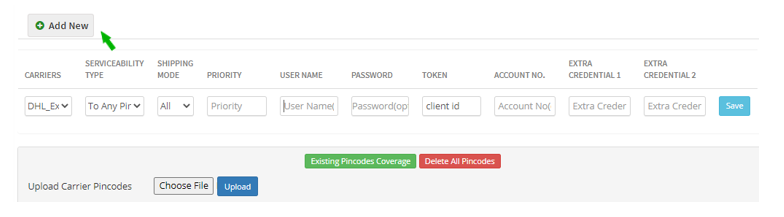
Here click on the “Add New” button.
Note: If you have already integrated other shipping carriers please scroll down to find the “Add New” button.
Step 3: Select GoSwift
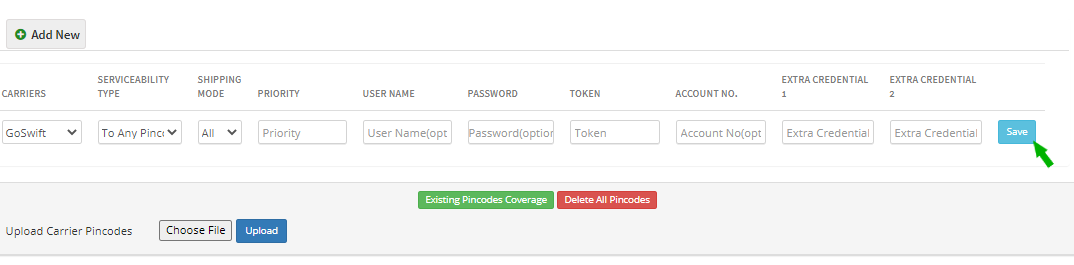
Select your Carrier as “GoSwift” from the drop-down options.
Enter your GoSwift credentials in the Username and Password field.
Enter your Client ID in the Token field. Please contact GoSwift Team for your Client ID.
Please Note: Incase of different location names in EE and GoSwift, please enter the warehouse name in the Account number field
Then click on the “Save” button.
Please note that company address and dispatch address should be same in EasyEcom and GoSwift.
You have now successfully integrated GoSwift with EasyEcom.
Related Articles
Integrating Ekart with EasyEcom
Overview Ekart can be integrated with EasyEcom as a shipping carrier to manage shipment creation, shipment tracking, and return processing. Once integrated, EasyEcom can create shipments in Ekart and receive shipment status updates. When to Use This ...
Integrating EasyGSP with EasyEcom
Overview EasyGSP cannot be integrated directly from EasyEcom. To integrate EasyGSP, contact the EasyEcom team. Once access is provided, configure EasyGSP from: Settings > Add Channels > EasyGSP EasyGSP access is provided separately for each location.
Integrating Loqally with EasyEcom
This guide explains how to configure the Loqally integration in EasyEcom, and also supports reverse shipment. Step 1: Navigate to Carrier Master Masters > Carrier Master Step 2: Click on 'Add New' and Select 'Loqally Outbound' from the dropdown Step ...
Integrating Shopee with EasyEcom
This guide explains how to connect your Shopee store with EasyEcom using the Shopee authorization flow. Prerequisites A valid Shopee seller account. Access to the Shopee account or merchant account that needs to be connected with EasyEcom. Step 1: ...
Integrating Marketplace using EasyEcom Standard APIs
You can easily integrate your marketplace with EasyEcom by following the process explained in this video and/or the integration workflow document shared with you. Marketplace Integration Frequently Asked Questions 1. Do we need to add carrier ...